An inverse tangent calculator (also known as an arcus tangent calculator) computes the arctangent (atan) of any real number and returns the angle whose tangent equals that value. Whether you are finding the angle of a slope by entering rise and run as opposite and adjacent, or simply converting a tangent ratio to degrees or radians, this angle finder gives you the result instantly. Enter a decimal or the ratio of opposite / adjacent sides from a right triangle, choose between degrees and radians, and get instant results. This arc tan calculator also draws an interactive triangle diagram, plots the arctan(x) graph, and displays a full tangent table—everything needed for trigonometry, calculus, and navigation calculations in one place.
Inverse Tangent Calculator
Result
Calculated
arctan(1)
45°
Degrees
45°
Radians
0.7854 rad
Gradians
50 grad
π Fraction
π/4
Interactive Right Triangle Diagram
This diagram updates when you calculate. The angle θ equals arctan(opposite ÷ adjacent).
Inverse Tangent Graph
The graph highlights the current input value. Hover for details.
What is Inverse Tangent?
Inverse tangent is a trigonometric function that returns the angle whose tangent equals a given number. The inverse tangent is written as tan−1(x), arctan(x), or atan(x). All 3 notations refer to the same inverse trigonometric function. In European and German textbooks this same function appears as arcus tangens or arkus tangens. On the unit circle, arctan returns the angle that corresponds to any tangent value along the circle.
In a right triangle, the tangent of angle θ equals the opposite side divided by the adjacent side. The inverse tangent reverses that operation: given the ratio opposite / adjacent, arctan returns the angle θ.
The domain of the inverse tangent function is all real numbers (−∞, +∞), and the range (principal value) is (−π/2, π/2) in radians or (−90°, 90°) in degrees. The inverse tangent is an odd function, meaning arctan(−x) = −arctan(x).
Interactive: Domain & Range of arctan(x)
Drag the slider to see how arctan maps any real number to an angle between −90° and 90°.
How to Calculate Inverse Tangent?
To calculate the inverse tangent, use the formula θ = arctan(x), where x is the tangent value and θ is the resulting angle.
3 steps summarize the tangent calculation process for the inverse of tangent:
- Identify the input value (x). The input is any real number—a decimal, a fraction, or the ratio opposite / adjacent from a right triangle.
- Apply the arctangent function. Use a scientific calculator, a programming language’s
atan()function, or Wolfram Alpha to compute tan−1(x). - Convert the result. Most math libraries return the answer in radians. Multiply the radian result by 180/π to get degrees, or multiply a degree value by π/180 to convert back to radians. Either way the inverse tan formula remains θ = arctan(x) throughout.
Interactive: Step–by–Step Calculation
Type a value to see each calculation step in real time.
1Input: x = 1
2arctan(1) = 0.7854 rad
3Convert: 0.7854 × 180/π = 45°
How to Use This Inverse Tangent Calculator?
To use this inverse tangent calculator, enter a number in the input field, select your preferred angle unit, and press “Calculate arctan(x).”
This arc tan calculator supports 2 input methods:
Input Methods
1
Decimal Value
Enter any real number (e.g., 0.5, 1, −2.75). The calculator computes arctan of that decimal and returns the angle in degrees, radians, and gradians.
2
Opposite / Adjacent
Enter the lengths of the opposite and adjacent sides of a right triangle. The calculator divides opposite by adjacent and applies arctan to the result, matching how trigonometry works in the unit circle and Pythagorean theorem problems.
After pressing calculate, the result panel shows 4 output formats: degrees, radians, gradians, and π fraction. Each value has a copy button for easy use in MATLAB, Excel, or Google Sheets.
How to Use Inverse Tangent on a Calculator?
Press the “2nd” or “Shift” key on a scientific calculator (such as Casio or TI–84), then press the “tan” button to access tan−1.
4 steps cover the process on most scientific calculators:
- Turn on the calculator and set the angle mode to degrees (DEG) or radians (RAD).
- Press “2nd” or “Shift.” This key activates the secondary functions printed above each button. This shift tan key combination is universal across Casio, TI–84, and Sharp models. Always set your angle mode to DEG or RAD before pressing it, since the same input returns different numbers depending on the mode.
- Press the “tan” key. The display shows “tan−1(” or “atan(”.
- Type the value and press “=”. The calculator returns the angle.
Visual Guide: Finding tan−1 on a Calculator
The image below shows the exact buttons to press on a TI–84 scientific calculator.
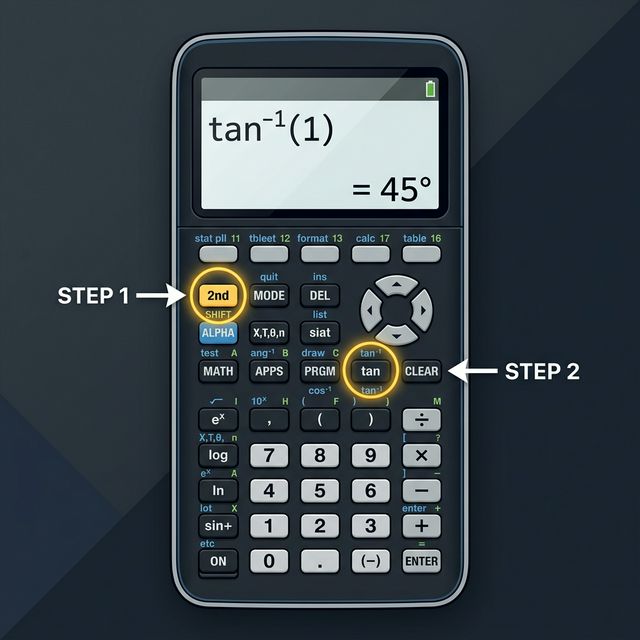
Finding tan−1(1) = 45° on a TI–84 calculator
How to Calculate Inverse Tangent Without a Calculator?
Use the arctangent Taylor series expansion to approximate arctan(x) by hand: arctan(x) = x − x3/3 + x5/5 − x7/7 + … This series converges when |x| ≤ 1.
3 manual methods exist for computing the inverse tangent without a calculator:
- Taylor series (Maclaurin series). The arctangent series approximation tool uses x − x3/3 + x5/5 − x7/7. More terms give higher precision. This method works best when |x| ≤ 1.
- Known angle values. Memorize common results: arctan(0) = 0°, arctan(1) = 45°, arctan(√3) = 60°, arctan(1/√3) = 30°. Use these as reference points.
- CORDIC algorithm. This hardware–level method computes arctangent through repeated angle rotations using only addition, subtraction, and bit–shifting—common in embedded systems and real–time processing.
Interactive: Taylor Series Approximation
Choose how many terms to include. Watch how the approximation converges toward the true value.
Inverse Tangent Graph
The arctan(x) graph is an S–shaped curve that passes through the origin and approaches −π/2 (−90°) as x → −∞ and π/2 (90°) as x → +∞.
3 key features define the arctangent graphical representation:
- Horizontal asymptotes at y = −π/2 and y = +π/2. The function never reaches ±90°.
- Odd symmetry. The graph reflects through the origin because arctan(−x) = −arctan(x).
- Monotonically increasing. The curve always rises from left to right. The arctangent derivative equals 1 / (1 + x2), which stays positive for all x.
Interactive: arctan(x) Graph
Hover over the graph to see the value at any point. The dashed lines mark the asymptotes at ±π/2.
Tangent Table
The tan inverse values at 0°, 30°, 45°, 60°, and 90° appear in nearly every trigonometry course and are worth committing to memory. Complete table of tangent and inverse tangent values for standard angles. Click any row to auto–calculate that value.
| x (Input) | arctan(x) Degrees | arctan(x) Radians | Fraction of π |
|---|---|---|---|
| −∞ | −90° | −1.5708 rad | −π/2 |
| −√3 ≈ −1.7321 | −60° | −1.0472 rad | −π/3 |
| −1 | −45° | −0.7854 rad | −π/4 |
| −1/√3 ≈ −0.5774 | −30° | −0.5236 rad | −π/6 |
| 0 | 0° | 0 rad | 0 |
| 1/√3 ≈ 0.5774 | 30° | 0.5236 rad | π/6 |
| 1 | 45° | 0.7854 rad | π/4 |
| √3 ≈ 1.7321 | 60° | 1.0472 rad | π/3 |
| +∞ | 90° | 1.5708 rad | π/2 |
Notation for the Inverse of Tangent
The notation for the inverse of tangent takes 3 standard forms: tan−1(x), arctan(x), and atan(x). All three notations describe the exact same mathematical function—the function that accepts a real number and returns the angle whose tangent equals that number.
Each notation appears in different contexts:
- tan−1(x) is the most common notation on scientific calculators, including Casio, TI–84, and Sharp models. The superscript −1 means “inverse function,” not “1 ÷ tan(x).” This distinction frequently confuses students—tan−1(x) returns an angle, whereas 1/tan(x) equals cot(x).
- arctan(x) is the standard notation in formal mathematics, especially in calculus and analysis. The prefix “arc” refers to the arc length on a unit circle that corresponds to the angle. Wolfram Alpha, many university textbooks, and Wikipedia use this form.
- atan(x) is the programming and software notation. JavaScript uses
Math.atan(x), Python usesmath.atan(x), MATLAB usesatan(x), and Excel/Google Sheets use=ATAN(value). The two–argument variantatan2(y, x)extends the range to (−π, π] for correct quadrant detection in navigation and robotics.
A common pitfall: the notation tan−1(x) does not mean the reciprocal of tangent. The reciprocal of tan(x) is cot(x) = cos(x) / sin(x), which is a completely different function. When you see tan−1 on a calculator or in a textbook, it always refers to the inverse tangent (arctangent) operation.
Some students informally call it anti tangent since it reverses what tangent does, though this is not standard mathematical terminology.
Interactive: Notation Comparison
Click each notation to highlight where it appears in math, programming, and calculators.
tan−1(x) is the most common notation on physical calculators, including Casio and TI–84 models. The superscript −1 indicates “inverse function,” not “1 / tan(x).” This notation dominates algebra and trigonometry textbooks.
Finding tan−1 of Negative Numbers
The tan−1 of negative numbers returns a negative angle. Because arctan is an odd function, arctan(−x) = −arctan(x). A negative input always maps to an angle between −90° and 0° (−π/2 and 0 radians).
2 examples of tan−1 of negative numbers:
- arctan(−1) = −45° or −π/4 radians
- arctan(−√3) = −60° or −π/3 radians
What is the tan−1 of −1?
The tan−1 of −1 is −45° (−π/4 radians or −0.7854 radians). This result means an angle of −45° has a tangent value of −1. On the unit circle, this angle corresponds to a point in the fourth quadrant where the opposite side and adjacent side have equal absolute lengths but opposite signs.
Interactive: Negative Value Explorer
Enter any negative number to see how arctan maps negative inputs to negative angles.
arctan(−1) = −45° = −π/4 rad
arctan(1) = 45° ↔ arctan(−1) = −45°
FAQs
Answers to common questions about inverse tangent calculations
Yes, tan⁻¹ is the standard mathematical notation for inverse tangent, also called arctangent or arctan. The superscript ⁻¹ does not mean 1/tan (which is cotangent). Instead, tan⁻¹(x) asks: 'What angle has a tangent equal to x?' For example, tan⁻¹(1) = 45° because tan(45°) = 1. You may also see it written as arctan(x) or atan(x) in programming languages.
The tangent function takes an angle and returns a ratio of the opposite side to the adjacent side in a right triangle. The inverse tangent (arctan) does the reverse: it takes a ratio and returns the corresponding angle. For instance, tan(45°) = 1, so arctan(1) = 45°. Tangent has a domain of all real numbers except odd multiples of 90°, while inverse tangent accepts all real numbers and outputs angles between −90° and 90° (−π/2 to π/2 radians).
The inverse tangent button sits above the tan key on most scientific calculators. To access it, press the 2nd or Shift key first, then press the tan button. The display will show tan⁻¹ or arctan. On graphing calculators like the TI-84, press 2nd then TAN. On Casio calculators, press SHIFT then tan.
Use the Taylor series expansion: arctan(x) = x − x³/3 + x⁵/5 − x⁷/7 + ... for |x| ≤ 1. For common values, memorize key angles: arctan(0) = 0°, arctan(1/√3) = 30°, arctan(1) = 45°, arctan(√3) = 60°. You can also use the CORDIC algorithm. For values outside [−1, 1], use the identity arctan(x) = π/2 − arctan(1/x) for x > 0.
The inverse tangent of 1 is 45° (or π/4 radians). This is because tan(45°) = 1. In a right triangle where the opposite and adjacent sides are equal, the angle is 45°.
Tan converts an angle into a ratio (opposite/adjacent), while inverse tan (arctan) converts a ratio back into an angle. Tan is periodic and can produce any real number, while arctan always returns a unique angle in the range (−90°, 90°).
Yes, use the formula =ATAN(value) in Excel. This returns the result in radians. To convert to degrees, use =DEGREES(ATAN(value)). Excel also supports =ATAN2(x, y) for two-argument arctangent.
Rotate your iPhone to landscape orientation to reveal the scientific calculator. Tap the 2nd button to switch to inverse functions. The tan button will change to tan⁻¹. Enter your value and tap tan⁻¹.
In a right triangle, the inverse tangent of the ratio opposite/adjacent equals the angle at that vertex. If opposite = 3 and adjacent = 4, then arctan(3/4) ≈ 36.87°.
There are 6 common applications: (1) Navigation and GPS for bearing angles, (2) Engineering for slope angles, (3) Physics for force vectors, (4) Computer graphics for rotation, (5) Electrical engineering for phase angles, (6) Astronomy for elevation angles.
Through tan(θ) = sin(θ)/cos(θ). If θ = arctan(x), then sin(θ) = x/√(1+x²) and cos(θ) = 1/√(1+x²). The derivative of arctan(x) is 1/(1+x²).
Yes. A slope ratio is the same as opposite over adjacent in a right triangle. Enter your rise as the opposite side and your run as the adjacent side and the tool returns the angle of inclination in both degrees and radians.
This tool is built specifically for arctangent. If you need a full inverse trig calculator covering arcsin and arccos alongside arctan, you would need a broader inverse trigonometry tool.